AI-generated street scene; plates and faces redacted by the system are marked in green

Privacy redaction for images and video

Do it yourself with Damaya; integrate with the ORedact API

Faces, license plates and sensitive text are detected and redacted automatically. The enterprise API is available by invitation: validate on your footage first, then agree on integration and pricing.

AI-generated scene, no real person; green marks show the faces and plates Damaya redacted

Which one fits you

Individuals and small teams upload and process directly; teams integrating into their own systems apply for an API trial.

Self-service web app

Damaya

Upload an image or video; the system detects faces, plates and sensitive text, you confirm in the editor and export.

  • Free trial allowance, monthly passes
  • Keep selected people, add manual redactions; five styles: mosaic, blur, solid, eye bar, sticker
  • Review and download in the browser, nothing to install
Use DamayaAbout Damaya

Integration · by invitation

ORedact API

Bring redaction into your workflow: submit a task, poll its status, receive a callback. Validate on your footage first, then fix scope and pricing.

  • Per image and per second of video; only successful processing is charged
  • 14-day trial: 100 images + 10 minutes of video
  • Retention, concurrency and support confirmed in writing before go-live
View API pricing

Scope

Available now: faces, license plates and sensitive text in video and images.Video Privacy ProcessingImage Privacy Processing

Assessed first: text and document redaction.Text Privacy ProcessingFile Privacy Processing

Capabilities and rules

What Damaya and the enterprise API actually provide, plus the billing and data rules that apply on integration.

Targets: faces, license plates and sensitive text in images (phone numbers, addresses, ID numbers).

Every frame of a video is processed; moving faces and plates are covered continuously along their tracks, not only on key frames.

Review every object in the editor afterwards: keep selected people, add regions and re-render without uploading again.

Output matches the source specification with the audio track kept; 4K and HEVC sources are supported.

The API charges only for successful processing; system failures are free and automatic retries are not double-billed.

Retention and deletion of source files, caches and results are agreed in writing before go-live.

Common scenarios

Four kinds of footage, by where it comes from.

Inspections and field records

Phone photos and videos from site visits: remove bystanders' faces and plates before sharing.

Vehicle and road footage

Plates and faces in insurance, repair and road records, processed in bulk inside your existing system.

Publishing and collaboration

Passers-by in shop visits, street footage and event videos before publishing.

Business system integration

Asynchronous submission, status polling and result callbacks; integrate first, then go live.

Results

Real output frames; validate on your own samples.

Faces in a crowd(After)
Faces in a crowd(Before)
BeforeAfter

Faces in a crowd

An AI-generated crowd image processed by the pipeline: every face softly blurred, clothing and background unchanged. Drag the slider to compare.

Text in images(Before)
Before
Text in images(After)
After

Text in images

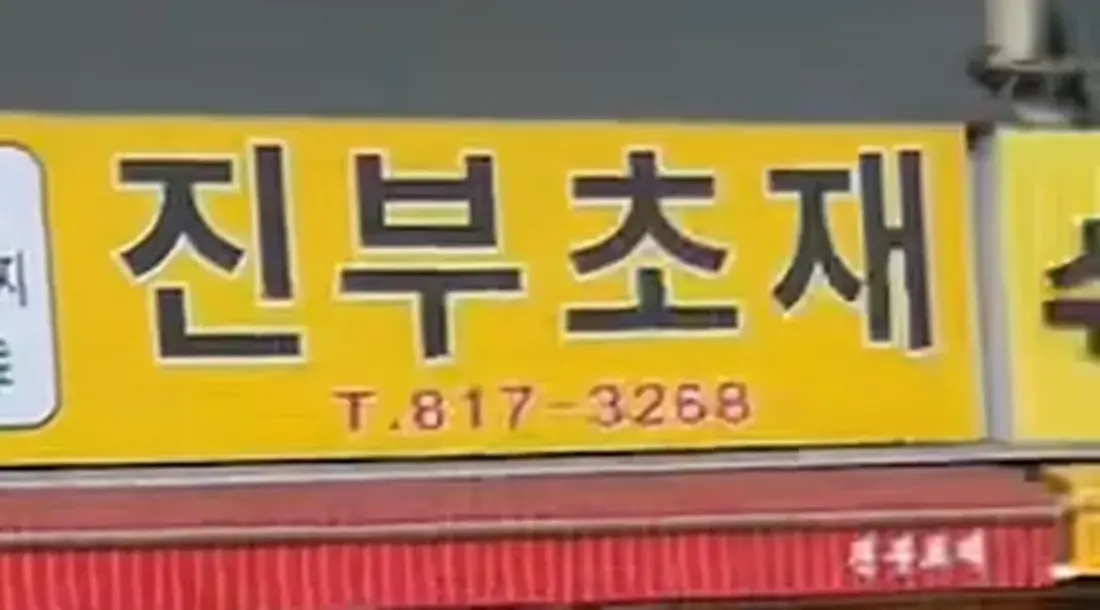
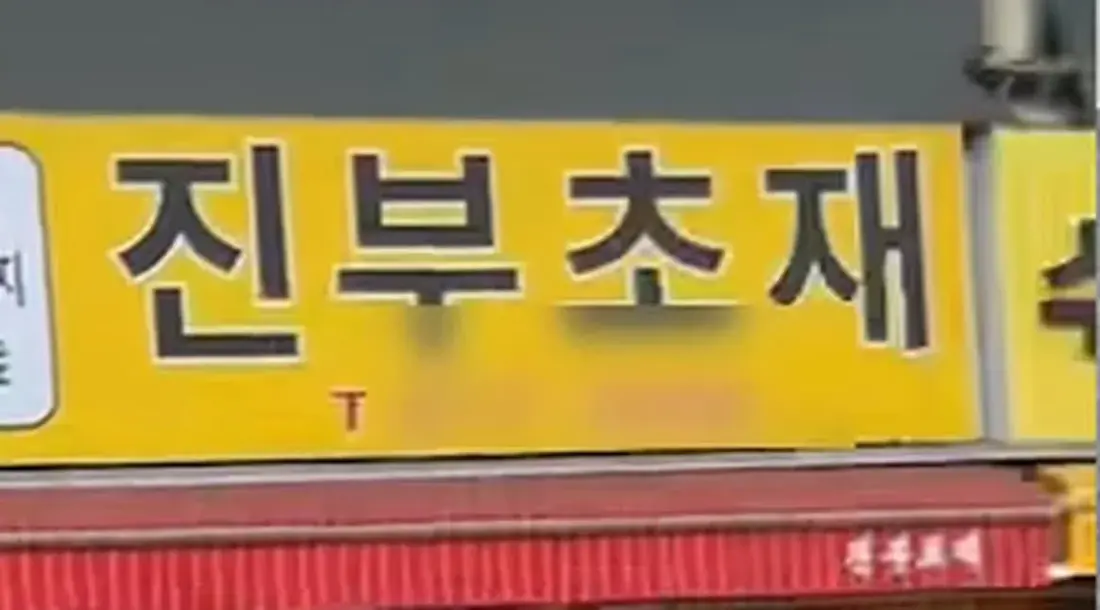
The phone number on a shop sign is masked; the shop name and other text stay.

Keep selected people(Automatic)
Automatic
Keep selected people(Kept)
Kept

Keep selected people

The automatic result blurs everyone; marking our own child as kept and re-rendering leaves everyone else blurred.

Output clips come from the Damaya production pipeline; the footage is phone video we shot ourselves. Some stills carry the preview watermark. The crowd, street and traffic source images are AI-generated and show no real person; the results are real production output. Text and document redaction are assessed with samples and are not shown here.

Three steps to integrate

Submit a task, check its status, fetch the result, or configure a callback. Interface documentation is provided during the trial.

  1. 1

    Submit a task

    Give the file location and targets (faces, plates, sensitive text); optionally the masking style and a callback URL.

  2. 2

    Check status

    Poll progress or wait for the callback; queueing and status checks are free.

  3. 3

    Fetch the result

    Download the output and object list and keep them within the agreed retention period.

# 1. Submit a task
POST /v1/tasks
{ "type": "video", "source": "<your file url>",
  "targets": ["face", "plate"], "callback": "<your url>" }

# 2. Check status
GET  /v1/tasks/{id}
{ "status": "processing", "progress": 62 }

# 3. Fetch the result
GET  /v1/tasks/{id}/result
{ "status": "done", "output": "<download url>", "objects": 149 }

Illustrative flow; endpoints and fields follow the integration documentation.

Bring redaction into your workflow

The enterprise API is available by invitation. Tell us your footage type, volume and turnaround needs; validate first, then agree on a plan.